
Let me be completely honest with you. A few years ago, on-page SEO was simple. Put your keyword in the title, write a decent blog post, and Google would eventually reward you for it. That era is over. In 2026, Google’s algorithm has become smarter, and competition is higher. If you’re still relying on old SEO tricks, It’s time to move on.
But there is one thing that still holds its place — On-page SEO is still the only area that gives you complete control over your SEO best practices. A backlink strategy that requires months of outreach and domain authority that takes years to build, on-page SEO improvements can show results within weeks. The first result on Google still captures nearly 40% of all clicks. The top three results together get more than half. That gap between position 1 and position 10 is not luck — it is on-page SEO done right.
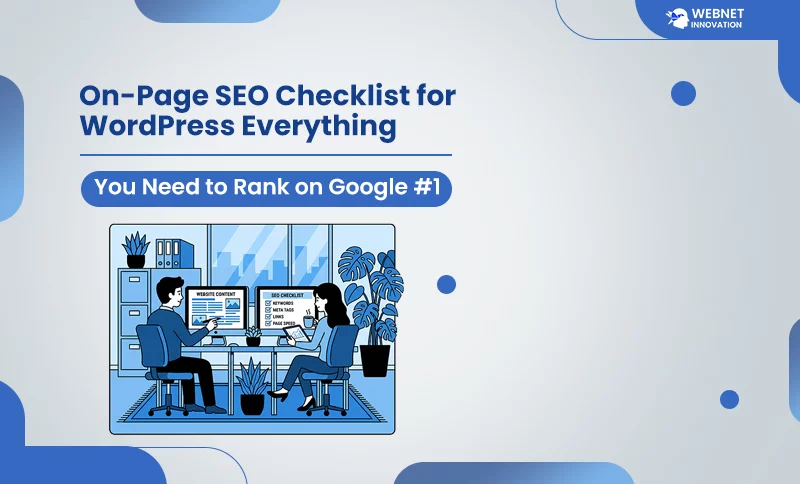
This checklist is built specifically for WordPress websites in 2026. Every item on it is based on what Google is actually rewarding right now — not what worked two years ago. Work through it page by page on your most important content, and you will start to see movement.
Table of Contents
What Is On-Page SEO and Why Does It Matter More Than Ever in 2026?

Think of your WordPress website like a physical shop on a busy street. On-page SEO is everything about your shop that you control — the sign above the door, the window display, how clean and organized it is inside, how easy it is to find what you came for, and how fast the person at the counter serves you. Google is a customer walking past. If your sign is unclear, your shop is cluttered, or it takes forever to load — they walk on to the next one.
Off-page SEO is what other people say about your shop — reviews, recommendations, people pointing others your direction. That matters too. But you cannot control what other people say. You can absolutely control what your shop looks like.
In 2026, Google’s algorithm uses a technique called ‘Neural Matching’ — a system that checks whether your page actually solves a problem or just repeats information that already exists everywhere else. This means keyword stuffing and copying a competitor’s structure no longer works. Google can now clearly distinguish between a page that is built to help the user and one that is just trying to rank.
The Complete On-Page SEO Checklist for WordPress — 2026 Edition
1. Match Your Content to Search Intent Before You Write a Single Word
This is your priority work that overrides everything else on this checklist. If your content doesn’t solve the problem the user was actually looking to fix when they typed that query, no amount of technical optimization is going to save it.
Here is a simple way to check. Open an incognito tab and search your target keyword. Look at the top three results. Are they blog posts, product pages, comparison articles, or video tutorials? Whatever format dominates those top results — that is what Google has decided users want for that keyword. Your content needs to match that format before anything else.
For example, if someone searches “how to speed up WordPress,” they want a tutorial with steps — not a sales page for a speed optimization service. If someone searches “best WordPress speed plugins,” they want a comparison list — not a technical deep dive. Getting this right is the difference between a page that ranks and one that Google ignores no matter how well optimized it is.
2. Write a Meta Title That Earns the Click
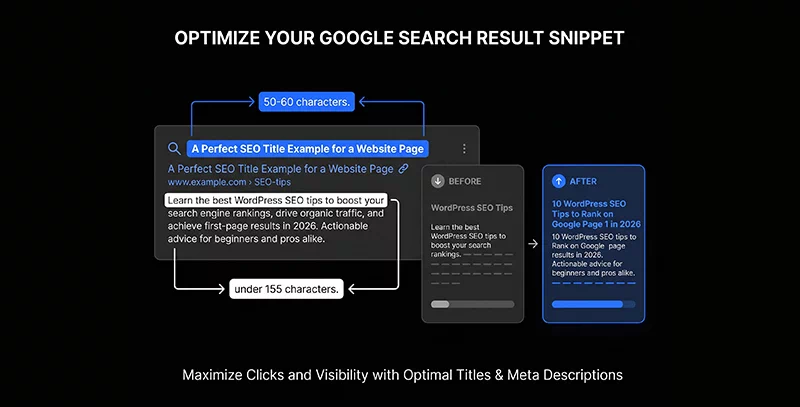
Your meta title is the single most important line of text on your entire page. Not because it directly contains your keyword — but because it is the one thing standing between someone seeing your result on Google and deciding whether to click it or keep scrolling.
According to data from 2026 testing, titles between 50 and 60 characters with the primary keyword in the first five words deliver a 23% higher click-through rate than titles that bury the keyword or run too long. Think about that — same position on Google, same content — just a better title and 23% more people clicking.
What makes a strong meta title for WordPress in 2026:
- Primary keyword appears early — ideally in the first four to five words
- A specific number, year, or power word that adds credibility (“2026,” “Complete,” “Without,” “Step-by-Step”)
- A clear benefit or outcome — what does the reader get by clicking?
- Stays under 60 characters so Google does not cut it off
- Sounds like something a human would say, not a keyword list
In Rank Math or Yoast SEO, you set this in the SEO title field on every post. Never leave it as the default post title — always write a dedicated meta title that is built to get clicked.
3. Write a Meta Description That Sells the Click
The meta description does not directly affect your ranking position. But it absolutely affects how many people click — and click-through rate does affect how Google evaluates your page over time. If a page consistently gets clicked more than its competitors will gradually be rewarded with better positions.
Read your meta description like a pitch. If it doesn’t clearly explain the value and end with a quick ‘find out more’ or ‘see the list,’ you’re leaving clicks on the table. Make it useful, make it clear, and give them a reason to click through.
Keep it under 155 characters. Include your primary keyword naturally — Google bolds any words in the description that match what the user searched, which makes your result visually stand out. Check your Google Search Console data regularly — it shows you which pages have high impressions but low CTR, which almost always means the meta title or description needs work.
4. Optimize Your URL Slug — Short, Clean, Keyword-Rich
This one is quick but easy to get wrong. Your URL slug is the part after your domain name — for example, yoursite.com/on-page-seo-checklist-wordpress. Google reads this to understand what the page is about, and it shows in the Google results list before the user clicks.
The rules are simple:
- Keep it short — three to five words maximum
- Include your primary keyword
- Use hyphens between words, never underscores
- Remove stop words like “and,” “the,” “a,” “for”
- Never use dates in blog post URLs — they make content feel outdated fast
In WordPress, you set this in the “Permalink” field on the post editor. Once a page is live and indexed, changing the URL requires a 301 redirect — so get it right before you publish. A clean URL like /on-page-seo-checklist-wordpress outperforms a messy one like /2026/04/blog-post-about-seo-tips-for-wordpress-sites every single time.
5. Structure Your Headings Like a Table of Contents
Your H1, H2, and H3 tags are more than just design choices—they are the roadmap Google uses to understand your content’s hierarchy. In fact, Google’s crawlers usually scan your headings before they even touch your body text.
Every page needs exactly one H1—think of this as your book title. It’s where your primary keyword belongs. From there, use H2s for your ‘chapters’ and H3s for the specific sections within them.
Here’s a tip most people miss: use your H2s to house your secondary keywords and related terms. For example, if you’re targeting on-page SEO checklist for WordPress don’t just repeat that phrase. Branch out with H2s like ‘optimizing your WordPress posts’ or ‘beginner-friendly SEO tips.’ This gives Google clear signals about your expertise without making your writing feel forced or ‘keyword-stuffed.’ It’s better for the AI, and much better for your readers.
6. Place Your Primary Keyword Naturally in the First 100 Words
When you use the primary keyword in the first paragraph of the article, Google gives more value to that keyword. This does not mean cramming your keyword into the opening sentence in a way that feels forced. It means writing your introduction in a way that naturally includes the topic you are covering.
If your keyword is “on-page SEO checklist for WordPress,” your opening paragraph should naturally mention it as part of explaining what the post covers. The reader should never notice the keyword placement — it should just read like a well-written introduction that happens to tell them immediately they are in the right place.
7. Add Information That Nobody Else Has
This is the 2026 update to the old “write long-form content” advice. Google’s algorithms now evaluate something called Information Gain — whether your content adds anything new compared to what already exists on the topic. Content that simply reorganizes the same information found everywhere else is actively being pushed down in rankings.
What counts as original information:
- Your personal experience or case studies from your own work
- Specific examples from real projects you have handled
- Data or results from your own website or client websites
- Opinions and recommendations based on what you have actually tested
- A unique angle or perspective that the top-ranking pages do not cover
This is actually where WordPress developers and designers have a massive natural advantage. You have real experience. Google isn’t looking for textbook answers anymore; it’s looking for your experience. You’ve solved the problems and done the work—now let that show in your content. Use an AI SEO tools to audit your content to see how you measure up against the competition. It’ll show you exactly where your content is strong and where you need to add a bit more of that ‘real-world’ magic to fill the gaps.
8. Optimize Every Image on the Page
Heavy images are a silent performance killer. When you skip optimization, your pages slow down—and when you ignore alt text, you lose out on valuable SEO rankings. It’s a double-hit that most people overlook. These are common mistakes; you can easily fix them.
For every image you upload to WordPress:
- Compress it before uploading — tools like Squoosh or ShortPixel reduce file size by 60-80% without visible quality loss
- Use descriptive file names — “on-page-seo-checklist-wordpress.jpg” is better than “IMG_4821.jpg”
- Write alt text that describes the image naturally — include your keyword if it fits logically, but do not force it
- Use WebP format wherever possible — it is significantly smaller than JPG or PNG and WordPress now supports it natively
Google’s Vision AI in 2026 can detect whether your images are original or generic stock photos pulled from other sites. Original screenshots, custom graphics, and real photos from your work perform better than generic stock imagery both for SEO and for user engagement.
9. Fix Your Page Speed — Every Second Costs You Rankings
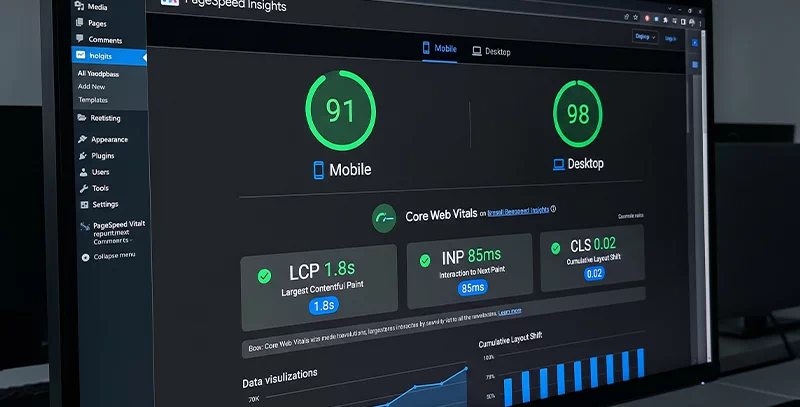
In 2026, Google uses three Core Web Vitals as confirmed ranking signals. These are not optional extras — they are factors Google is actively using to compare your page against competitors in the same ranking position.
The three metrics you need to know:
- LCP (Largest Contentful Paint) — how fast your main content loads. Should be under 2.5 seconds. Think of this as how quickly someone walking into your shop can see the main product display.
- INP (Interaction to Next Paint) — how quickly your page responds when someone clicks something. Should be under 200 milliseconds. This replaced FID in March 2024 and is stricter.
- CLS (Cumulative Layout Shift) — how stable your page is while loading. Should be under 0.1. If elements jump around while the page loads, this score suffers.
Check all three in Google PageSpeed Insights and in your Search Console Core Web Vitals report. If your scores are poor, the fastest fixes are usually image compression, removing unused plugins, enabling caching, and switching to a faster theme. The full process of diagnosing and fixing a slow WordPress website is detailed in a separate guide — but for this checklist, the minimum is knowing your scores and having a plan to fix the ones that are failing.
10. Build Smart Internal Links on Every Page
Internal linking is the most underused on-page SEO tactic for WordPress websites. Most people add one or two links as an afterthought. The websites ranking consistently in top positions treat internal linking as a deliberate strategy.
Every page you publish should link to at least three to five other relevant pages on your site using descriptive anchor text. “Click here” and “read more” are wasted opportunities. “How to set up Google Search Console for WordPress” or “complete WordPress speed optimization guide” are anchor texts that tell Google exactly what the linked page is about and reinforce your topical authority.
The flow of internal links also determines how Google distributes authority across your site. Your most important service pages and pillar content should receive internal links from multiple blog posts — not just sit there waiting for Google to discover them independently. Think of your internal links as roads connecting your content — the more roads lead to an important destination, the more traffic it gets.
11. Add Schema Markup to Every Important Page
Schema markup is code that tells Google exactly what type of content is on your page. It’s what enables star ratings, HowTo steps, and other visual enhancements you see in search results. Pages with schema types like Review and Product markup can see meaningfully higher click-through rates because they take up more visual space and give users more information before they click. One update worth knowing: as of 2026, FAQ schema no longer triggers a visible dropdown in regular Google search results — Google tightened this specifically to reduce FAQ schema being added to pages without genuine, visible FAQ content. It’s still worth adding if you have real FAQ content, since it helps Google and AI-driven tools like Perplexity and AI Overviews understand and potentially cite your content — the value just shifted from a visual search result to how well your content gets read by AI search systems.
For WordPress, Rank Math SEO makes schema implementation straightforward. For a blog post, add Article schema with your author details and publication date. For tutorial content, add HowTo schema, which still produces visible rich results. All of these can be done from within the Rank Math interface without touching any code. For the complete current picture on schema types and what’s changed, see my full guide on schema markup for WordPress.
12. Build Your E-E-A-T Signals Into Every Page
Google doesn’t just rank content anymore; it ranks the person behind the content. That’s where E-E-A-T comes in. It stands for Experience, Expertise, Authority, and Trust, and it’s essentially Google’s background check to see if you’re actually qualified to advise on your topic. In 2026, over 92% of top-ranking pages for competitive keywords include clear author credentials.
For a WordPress developer and designer writing about SEO, web design, and WordPress — your credentials are strong. Make sure they are visible. Every post needs a face and a name. Add your bio, highlight your years of experience and your niche. It’s not just for ego—it’s about proving you’re an expert worth listening to. Your About page should clearly state your background. Where you mention specific results — client pages that moved from position 14 to 4, websites where speed scores improved from 30 to 90 — include those specifics. Real results described specifically are a far stronger E-E-A-T signal than vague claims of expertise.
13. Update Your Content Regularly
Honesty, refreshed content earns 3.4 times more clicks than content that has not been updated. This does not mean rewriting your posts from scratch every few months. It means reviewing your top posts quarterly and asking: is anything outdated? Are there new tools, statistics, or techniques worth adding? Could the introduction be stronger? Search for new FAQ questions that users are asking.
Set a reminder in your calendar every three months for your top ten blog posts. Spend 30 minutes on each one improving something. Update the year in the title. Add a new section. Refresh an example. Request reindexing in Google Search Console after each update. This habit alone, done consistently, compounds into significant ranking improvements over time.