
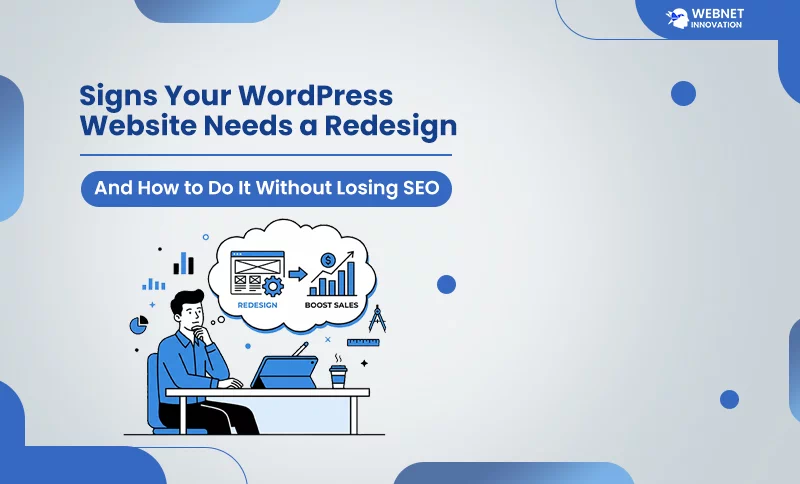
There comes a moment with every website when you open it on your phone, look at it the way a visitor would for the first time, and think — This does not represent my business anymore. Maybe it loads slowly. Maybe it looks like it was built three years ago because it was. Maybe you have been avoiding sending people to it because it is a little embarrassing. If any of that sounds familiar, you are probably at the point where a website redesign without losing SEO is not just a good idea — it is overdue.
This is such a problem where most business owners get stuck. When a business owner hears a story about people redesigning their websites and watching their Google rankings disappear overnight. That shocking situation creates fear, keeps them from making a change that their business genuinely needs.
But don’t worry about that, here is a good news for you. If you are not a professional website designer, you can still take a step towards website redesigning and it will not impact your website ranking. If you follow a well-planned, structured website redesign workflow, it can make your website faster and even improve your SEO performance. This guide will walk you through the clear signs that a redesign is necessary and exactly how to approach it so you protect every ranking you have worked hard to earn.
Table of Contents
What a Website Redesign Actually Means — And What It Does Not?
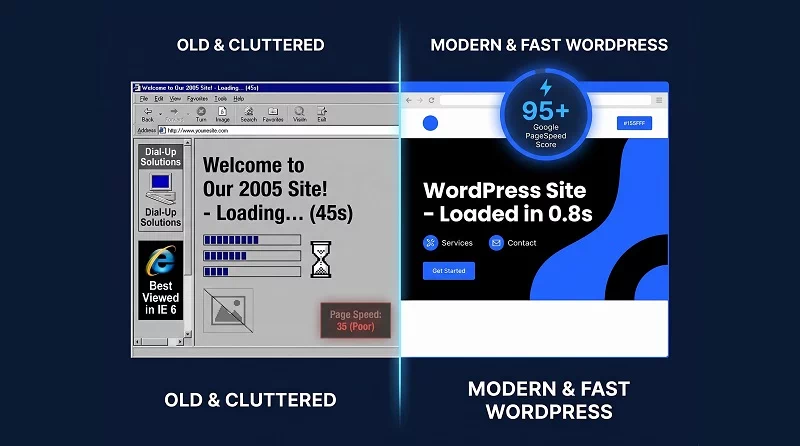
Before we get into anything else, let us clear up what a redesign actually is — because a lot of people confuse it with a full rebuild from scratch, and that is not always what is needed.
Redesigning a website can mean simply changing the overall look or theme of your WordPress site, but it can also mean doing a lot more.
It could be rearranging the ways your web pages refer to each other, rewriting main pages so they reflect the content visitors are really interested in, etc. However, it need not necessarily imply that you get rid of everything you have put together and begin all over again. Now let’s come to SEO risk during a redesign: it comes from specific things — changing your URLs without redirects, removing content that was already ranking, breaking your internal linking structure, or switching platforms without a proper migration plan. When those things are handled carefully, your rankings survive. When they are ignored, they do not.
7 Clear Signs Your WordPress Website Needs a Redesign
1. Your Website Looks Outdated Compared to Your Competitors
Open three of your competitor websites right now and compare them to yours. If they look cleaner, faster, and more modern — your visitors are making the same comparison. As seen in most cases, they decide in three seconds of landing on your page before they have read a single word.
In the age of AI, website design and development trends are constantly changing, so a website that looked attractive in 2022 may seem outdated in 2026. This is not about vanity — it is about trust. It is believed that 60% of online users judge a website by its good design instead of its quality. If your site looks old, potential customers quietly assume your business might be too.
2. Your Website Is Slow and Failing Core Web Vitals
This one is not subjective — it is measurable. Go to Google PageSpeed Insights right now and test your website on mobile. If your performance score is below 50 on mobile, you have a real problem. If it is below 30, it is affecting your Google rankings directly. Site speed is not just a user experience issue anymore. Google uses this as a ranking factor, and Core Web Vitals has long been incorporated into the way Google evaluates pages, causing slow websites to drop in rankings and giving your competitors an advantage.
When your business website runs on WordPress, a common reason WordPress websites slow down over time is accumulated plugins, heavy page builder code, unoptimized images, and themes that were never built with performance in mind. This is not the case at all; the way to increase speed has been closed. Sometimes, we can improve the page speed of a website using simple wordpress page speed optimization tricks. But when the slowness is baked into the theme and structure itself, a redesign is the cleaner and more permanent solution.
3. Your Traffic Is Dropping But Your Content Is Still Good
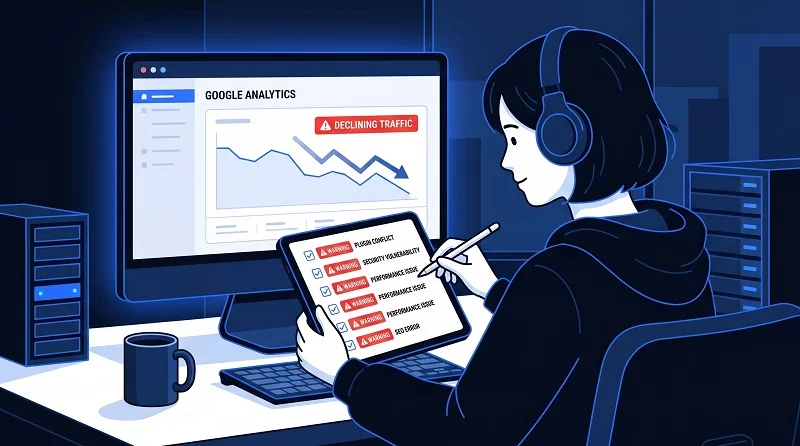
This is the one that confuses people the most. You have good blog posts, decent keyword rankings, and a content schedule — but traffic has been gradually declining for months. The content is not the problem. The website structure is.
As we know very well, Google crawls every website on the internet and finds a worst page hierarchy, poor internal linking, duplicate content across pages, and a mobile experience that is not up to standard, it starts pulling your pages down in rankings even if the content quality is fine. You need to be prepared for this. Regularly checking your Google Search Console data will tell you exactly which pages are losing rankings and the reasons why pages are losing their positions. A redesign that improves site structure, navigation, and internal linking often recovers this kind of traffic drop faster than any amount of new content would.
4. Your Website Is Not Performing on Mobile
As per the reports, more than 60% of web traffic comes from mobile devices. If your WordPress website was built only for desktop and just squished down in the mobile version, your website is losing visitors before they even read your headline.
Mobile first strategy is a major factor in ranking, which means it primarily uses the mobile version of your website to decide how to rank it. A site that looks fine on a laptop but breaks on a phone is being ranked based on its broken mobile version. A proper redesign built mobile-first from the ground up solves this permanently.
5. Visitors Are Landing But Not Taking Any Action
If your Google Search Console is showing high traffic, low conversions — this is one of the clearest signals that something is wrong with your website. If people are finding you on Google, clicking through, and then leaving without filling out a contact form, calling you, or making a purchase, the issue is seldom the product or service. It is the journey the website takes them on.
Placement of weak or missing calls to action, wrong navigation, too many competing options on one page, or a homepage that does not clearly explain what you do — these are design problems, not content problems. A redesign that focuses on conversion-friendly layout, clear messaging, and strategic call-to-action placement can turn the same traffic into dramatically more leads.
6. You Cannot Update Your Own Website Without Help
You could be stuck in a web development problem if you choose the wrong platform for website development. You need a developer to make a simple change to your website – updating phone number, adding a new service, posting a blog, spend an hour figuring out where things are. Your website may prove to be harmful for you. Outdated coding style, website builders, and old WordPress themes often reach a point where updating the code and API library becomes more trouble than building fresh.
When you run a good business, it becomes necessary to choose affordable web design services in India. You don’t need to pay a high amount for a modern WordPress redesign with a clean, well-organized theme and a page builder you are comfortable with puts you back in control. You should be able to manage your own content without technical stress.
7. Your Branding Has Changed But Your Website Has Not
Your logo changed. Your services evolved. Your target audience shifted. Your brand colors are different. But your website should reflect your brand identity, just like it did three years ago. It continues the legacy of your brand with your old visitors who discover you on social media or LinkedIn, and they appreciate your hard work. Website redesign is not only an upgrade it shows you’re running your business with trends.
How to Redesign Your WordPress Website Without Losing SEO?
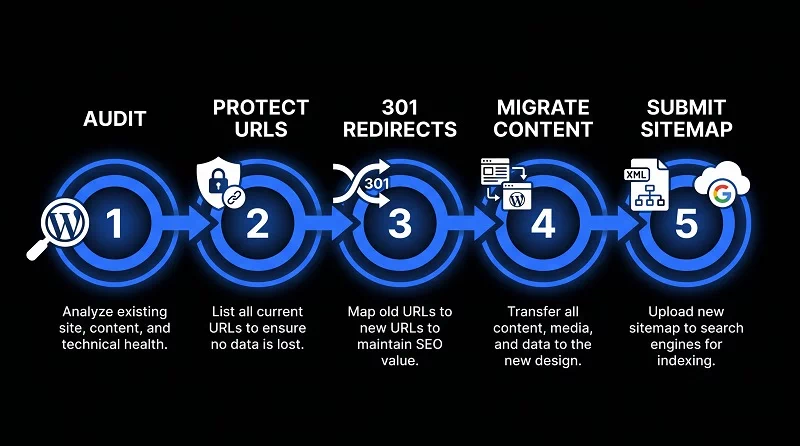
This is the section that matters most if you are worried about keeping your Google rankings through a redesign. Follow these steps and you will not lose what you have built.
Step 1 — Audit Your Current Website Before Touching Anything
Before starting to change a single page, collect your website data that is currently working. Export your website Google Search Console data and identify every page that is getting impressions and clicks. Make a list of your top-ranking pages and their exact URLs. These are the pages you need to protect no matter what changes during the redesign.
This audit also tells you what not to redesign. If a page is ranking well and getting high traffic, your goal is to improve its design and speed — not restructure its content or change its URL. You can also use AI SEO tools to audit your site content before redesigning to spot any weaknesses you can fix during the process.
Step 2 — Keep Your High-Performing URLs Exactly As They Are
This is the single most important rule in any website redesign. If a page URL is currently ranking on Google, that URL must stay the same after the redesign. Changing a URL is like moving a shop to a new address without telling anyone — Google has to rediscover it from scratch, and it loses all the authority it had built up.
Keeping your URL structure the same during a WordPress redesign is simple—it’s like moving into a new house but keeping your old phone number. Everything looks fresh, but people can still find you exactly where they expect.
Step 3 — Set Up 301 Redirects for Any URLs That Must Change
Sometimes we can’t avoid a URL change during a redesign — especially if you are reorganizing your site structure or moving from one platform to another. In these cases, a 301 redirect becomes necessary. A 301 redirect tells Google the existing URL has permanently moved to the new URL and gives the SEO authority to the new URL.
In WordPress, plugins like Rank Math SEO or Redirection make setting up 301 redirects straightforward. Plugins give authority to map every old URL to its new destination before launch, and Google follows the redirection without a major ranking drop. Missing even a few important redirects can cause traffic loss that takes months to recover.
Step 4 — Preserve and Improve Your Best Content
When redesigning a website, it’s tempting to remove pages that display a 404 Page Not Found error, contain outdated content, or are no longer necessary to maintain on the website. Before removing any page, you need to identify the search traffic. A page that looks thin to you might be ranking for a long-tail keyword that brings a small but consistent stream of visitors.
- Improve the content instead of deleting it.
- Update the year references.
- Add new sections.
- Improve the formatting.
- Fix the meta title and description.
A redesign is the perfect opportunity to improve existing content rather than start from scratch — and Google rewards updated, improved content with better rankings.
Step 5 — Test Everything on Staging Before Going Live
Don’t launch your website directly from the live environment after redesigning. Before launch, set up that website on a demo version for testing, keep patience, and check everything is fine. During testing the website on the demo version, keep the website noindex.
Before your visitors or Google encounter broken links, missing pages, or redirect errors, crawl your staging site with a tool like Screaming Frog or Ahrefs to find them. You can save your time and stress of a bad launch by testing the redesigned website on the staging environment.
Step 6 — Submit Your New Sitemap Immediately After Launch
The moment your redesigned website goes live, log into Google Search Console and submit your updated XML sitemap. For WordPress sites, Rank Math SEO generates and updates your sitemap automatically — you just need to submit the sitemap URL in GSC.
This tells Google to crawl your redesigned site fresh and start indexing the updated pages. Once the website is working well, open the list of important URLs and go to the Search Console to request indexing for your most important pages individually. Do not wait for Google to find them on its own schedule.
Website Redesign SEO Mistakes That Kill Your Rankings
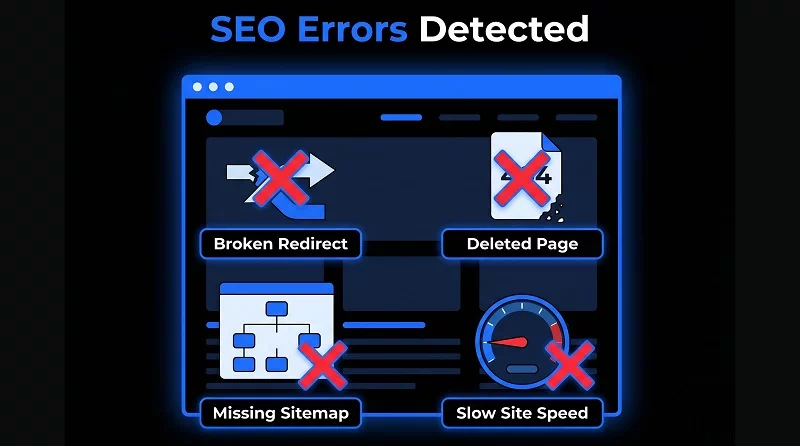
When people plan a redesign carefully, a few common mistakes still repeatedly cause ranking drops. Here is what to watch for:
- Deleting pages without redirects — Every page that gets removed without a 301 redirect becomes a dead end for Google and for any links pointing to it from other websites. This is the number one cause of post-redesign traffic crashes.
- Switching to a slower theme — Don’t choose a WordPress theme just by looking at the design. During the selection of a theme, check the coding structure and also a loading speed test. Always test a new theme’s speed on a demo before installing it for your live site.
- Forgetting to update internal links — When you’re done redesigning, old internal links on your blog posts and pages often still point to the previous URL structure. Check your top pages and update any internal links that now point to redirected rather than direct URLs.
- Launching without checking mobile — Always test every page of your redesigned website on multiple real devices, not just a browser simulation. What looks fine in Chrome’s mobile view sometimes breaks completely on an actual iPhone or Android.
- Removing schema markup — If your current website has FAQ schema, HowTo schema, or Article schema set up, make sure your redesigned site carries those over. Schema markup takes time to rebuild its impact in search results.
Redesign vs Refresh — How to Know Which One You Actually Need
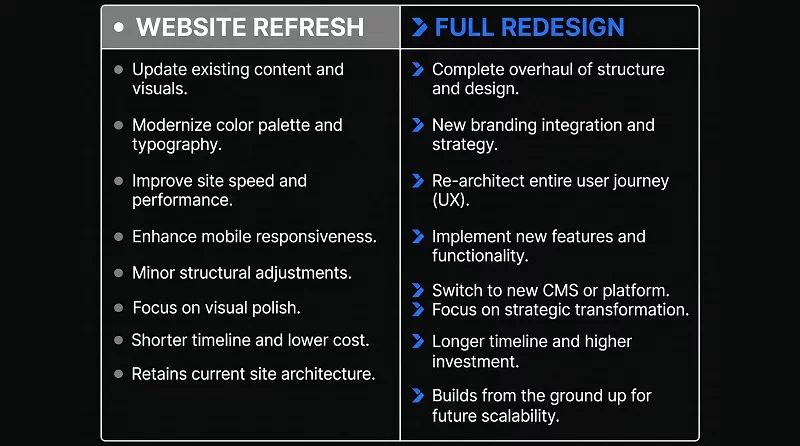
Not every old-style website needs a complete redesign. Sometimes, a small change could be enough. Here is a simple way to decide:
You probably need a refresh if:
- Your core structure and navigation work well
- Your website speed scores are already good
- Only a few pages look visually outdated
- Your mobile experience is solid
You probably need a full redesign if:
- Your website is more than 3 years old and has not been substantially updated
- Your mobile PageSpeed score is below 50
- Your bounce rate is above 70%
- Visitors consistently cannot find what they are looking for
- Your branding has changed significantly
- You cannot update your own content without help
When in doubt, start with a proper page speed optimization audit. Often the performance fixes alone reveal deeper structural issues that point clearly toward whether a refresh or a full redesign is the right call.
Does a Website Redesign Actually Improve SEO?
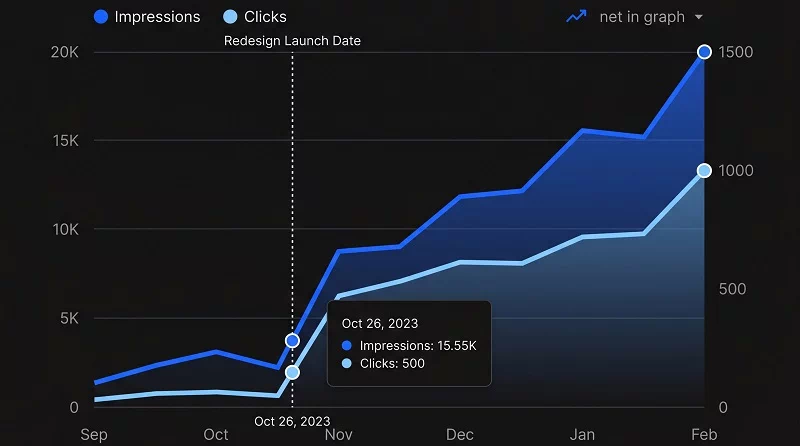
When people ask whether a website redesign improves SEO, the honest answer is — it depends entirely on how the redesign is executed. A poorly managed redesign absolutely can tank rankings. A well-planned one can push rankings significantly higher.
If a redesign process is done in a proper way, it will improve SEO ranking instead of hurting it. When someone rebuilds your website with a faster theme, cleaner code, better mobile performance, improved site structure, and stronger internal linking — Google bots crawl quickly and understand the content easily. Even those pages that were underperforming due to technical issues in the old structure will finally start reaching their full potential.
Once a website redesign is complete, the content improvements that usually come with it – like updated page content, better meta titles, clearer topical structure, improved FAQ sections – give Google more reasons to rank your pages higher for the right searches.
When businesses lose their rankings after a redesign, it’s usually because they cut corners—skipping the audit, messing up URL redirects, or deleting pages that were actually doing a lot of the heavy lifting. The good news? These are all totally avoidable mistakes.
Final Thoughts — Your Website Is Either Working for You or Against You
There is no middle ground here. In 2026, a slow, outdated, or confusing website does not just sit quietly in the background. It actively costs you leads, rankings, and credibility every single day it stays live in its current state.
A website redesign without losing SEO is absolutely achievable — but it requires doing things in the right order. Audit first. Protect your performing URLs. Handle redirects carefully. Improve content while you are at it. Test everything before launch. Submit your sitemap immediately after.
If you have been putting off a redesign because you were worried about losing what you have built on Google — that worry is valid, but it does not have to stop you. With a solid plan, a redesign is easily the best SEO investment you can make for your WordPress site. Leveraging expert website redesign services in India means you aren’t just changing the theme—you’re optimizing your entire digital future.
A redesign isn’t just about changing how your site looks; it’s about finally letting your business perform at the level it deserves.